
Share:
After every logo you spend an hour exporting one file at a time: color, black, white, each brand color on its own, horizontal and vertical, all in several formats and sizes.
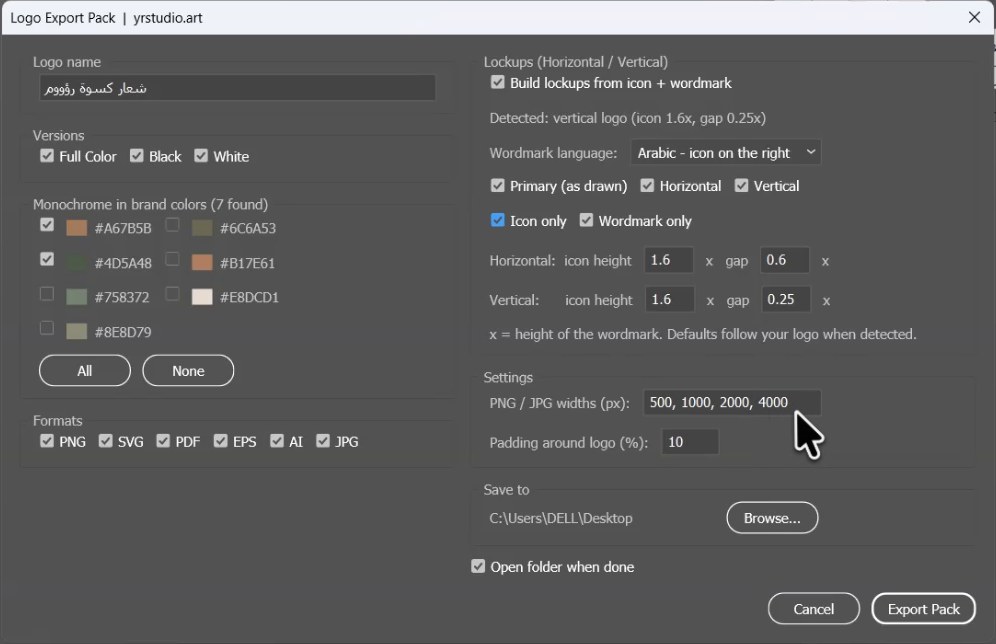
I made an Illustrator script that does all of it in one click. On a real logo it exported 145 files, sorted into folders. (The guide inside is in Arabic.)
Download the script for free ↓
Short link: yrstudio.art/go/script
What it does
- Every color version: full color, black, white, and a monochrome version in each brand color. It finds the colors itself.
- Horizontal and vertical: built from the icon and the wordmark with the same proportions you drew, plus icon-only and wordmark-only.
- Arabic puts the icon on the right: English puts it on the left.
- Every format: transparent PNG at exact pixel widths, SVG, PDF, EPS, and optional AI and JPG.
- Organized folders: clear file names, and your original file is never touched.
Install in 3 steps
- Extract the archive and run Open-Scripts-Folder.jsx from File › Scripts › Other Script. It opens the right Scripts folder.
- Copy Logo-Export-Pack.jsx into that folder.
- Restart Illustrator. It's now in File › Scripts.
For the horizontal and vertical lockups, keep the icon in one group and the text in another. Full details are in the read me PDF inside.
Download the script for free ↓
Short link: yrstudio.art/go/script
#Illustrator#سكريبت#تسليم اللوجو#أدوات مجانية
Frequently asked questions
Which Illustrator versions does it work with?
It was tested on Illustrator 2026 on Windows and is written in ExtendScript, which Illustrator CC versions support.
Why are the horizontal and vertical options disabled?
The logo must be two parts: the icon in one group and the text in another.
Does it change my original file?
No. Everything happens in temporary documents.
Ready to build a stronger brand?
Book a free discovery call — we'll walk through your current position and where to grow, step by step.
Book a Discovery Call