
Share:
If you upscale a photo of a person with AI and get back someone who just looks like them, the tool is not the problem. The prompt is. (The full guide is in Arabic; the prompt is in English.)
AI tools don’t enlarge the photo; they redraw it, and they guess whatever isn’t clear. Ask them to “improve the quality” and they feel free to change and beautify.
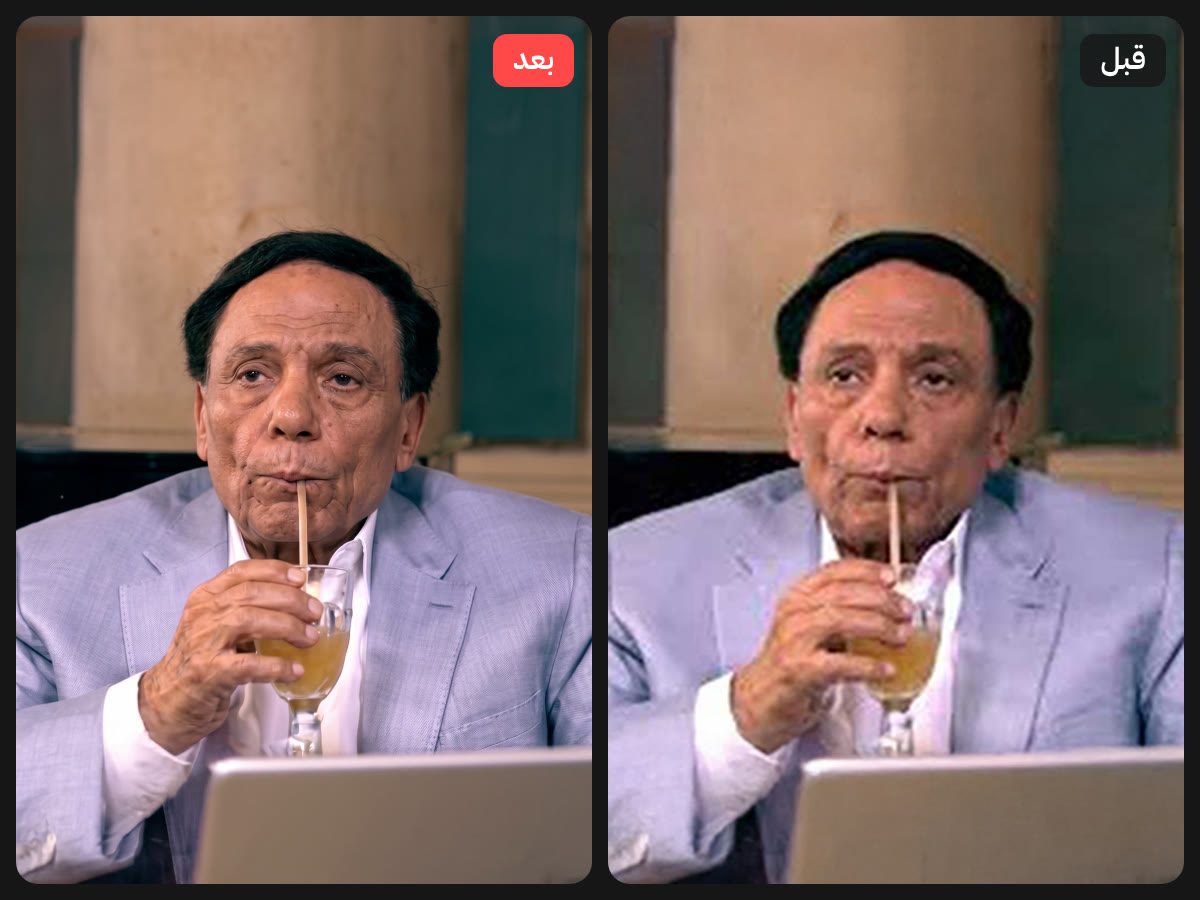
The prompt
Copy it as is and send it with the photo in the same message in Gemini. The key line: This is the SAME person, not a look-alike.
TASK: Professional image restoration and upscaling — NOT re-creation.

Restore the attached low-resolution, pixelated, blurry, and compressed image into a sharp, high-resolution, photorealistic version, as if the original was captured with a professional full-frame camera and a prime lens.

ABSOLUTE IDENTITY LOCK (highest priority):

* This is the SAME person, not a look-alike. Preserve 100% of the facial identity.
* Keep the exact face shape, jawline, cheekbones, forehead, chin, and proportions.
* Keep the exact eyes (shape, size, spacing, eyelids, iris color), eyebrows (shape, thickness, density), nose (bridge, tip, nostrils), lips (shape, thickness, color), and ears.
* Keep the exact skin tone and undertone — do not lighten, darken, or change its hue.
* Keep the real skin texture: visible pores, fine lines, natural imperfections, freckles, moles, scars, and blemishes exactly where they are. NO beauty filter, NO plastic or airbrushed skin, NO smoothing.
* Keep the exact hairstyle, hairline, hair color, length, volume, and parting. Rebuild individual hair strands and flyaways naturally, following the original hair direction.
* Keep facial hair (beard, mustache, stubble) with the same shape, density, and pattern.
* Keep the same age, expression, head angle, and gaze direction.

PRESERVE EVERYTHING ELSE:

* Same composition, framing, crop, and aspect ratio. Do not zoom, extend, or reframe.
* Same pose, body, clothing, accessories, jewelry, glasses, and background.
* Same lighting direction, color grading, white balance, and overall mood.
* Do not add, remove, or move any element. Do not change any text or logos in the image.

RESTORATION WORK TO DO:

* Remove pixelation, JPEG compression artifacts, blocking, banding, color noise, and blur.
* Reconstruct fine details realistically: skin micro-texture, eyelashes, iris detail, lip texture, hair strands, fabric weave, and edges.
* Recover natural sharpness and micro-contrast without over-sharpening, halos, or HDR look.
* Keep natural, subtle photographic grain consistent with a real photo.
* Output the highest resolution possible.

If any detail is too degraded to read, reconstruct it in the most faithful and conservative way based on the surrounding pixels — never invent new features or "improve" the person's appearance.

Final result must look like the original high-quality photo of the exact same person, not an AI-generated portrait.
And if the face still changes?
That happens when the photo is very pixelated. The guide covers it:
- The multi-photo trick: send several photos of the same person, with a ready add-on prompt.
- 7 ready fix messages: eyes, smile, skin, clothing, colourising, framing and text.
- A comparison test before you use the photo in a design.
- When not to use this method, and how to prepare the photo for print.
Short link: yrstudio.art/go/upscale
#AI#Gemini#برومبت#رفع جودة الصور
Frequently asked questions
Why does AI change the face when I upscale a photo?
Because it redraws the photo instead of enlarging it and guesses unclear details. The prompt must say it is the same person and what must not change.
Is the guide free?
Yes, it is completely free to download as a PDF from this page.
Ready to build a stronger brand?
Book a free discovery call — we'll walk through your current position and where to grow, step by step.
Book a Discovery Call