
مشاركة:
لو بترفع جودة صورة لشخص بالـ AI وبيطلعلك واحد شبهه، العيب مش في الأداة. العيب في البرومت اللي بتكتبهوله.
الأداة مش بتكبّر الصورة، دي بترسمها من جديد، واللي مش واضح فيها بتخمّنه. فلو قلتلها «ارفع الجودة» وبس، هتفهم إنها حرة تغيّر وتجمّل.
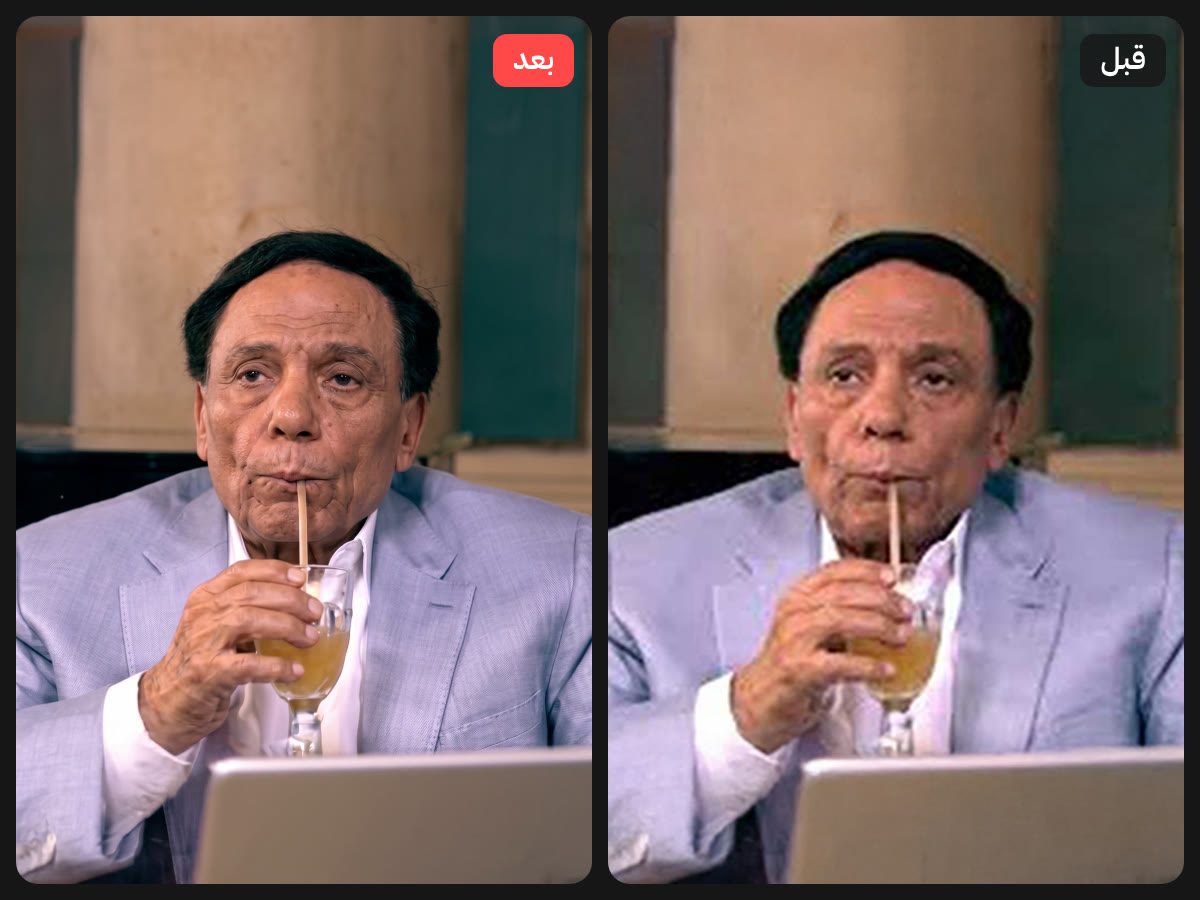
البرومت
انسخه زي ما هو، وحطه مع الصورة في نفس الرسالة على Gemini. أهم سطر فيه:
This is the SAME person, not a look-alike.
TASK: Professional image restoration and upscaling — NOT re-creation.

Restore the attached low-resolution, pixelated, blurry, and compressed image into a sharp, high-resolution, photorealistic version, as if the original was captured with a professional full-frame camera and a prime lens.

ABSOLUTE IDENTITY LOCK (highest priority):

* This is the SAME person, not a look-alike. Preserve 100% of the facial identity.
* Keep the exact face shape, jawline, cheekbones, forehead, chin, and proportions.
* Keep the exact eyes (shape, size, spacing, eyelids, iris color), eyebrows (shape, thickness, density), nose (bridge, tip, nostrils), lips (shape, thickness, color), and ears.
* Keep the exact skin tone and undertone — do not lighten, darken, or change its hue.
* Keep the real skin texture: visible pores, fine lines, natural imperfections, freckles, moles, scars, and blemishes exactly where they are. NO beauty filter, NO plastic or airbrushed skin, NO smoothing.
* Keep the exact hairstyle, hairline, hair color, length, volume, and parting. Rebuild individual hair strands and flyaways naturally, following the original hair direction.
* Keep facial hair (beard, mustache, stubble) with the same shape, density, and pattern.
* Keep the same age, expression, head angle, and gaze direction.

PRESERVE EVERYTHING ELSE:

* Same composition, framing, crop, and aspect ratio. Do not zoom, extend, or reframe.
* Same pose, body, clothing, accessories, jewelry, glasses, and background.
* Same lighting direction, color grading, white balance, and overall mood.
* Do not add, remove, or move any element. Do not change any text or logos in the image.

RESTORATION WORK TO DO:

* Remove pixelation, JPEG compression artifacts, blocking, banding, color noise, and blur.
* Reconstruct fine details realistically: skin micro-texture, eyelashes, iris detail, lip texture, hair strands, fabric weave, and edges.
* Recover natural sharpness and micro-contrast without over-sharpening, halos, or HDR look.
* Keep natural, subtle photographic grain consistent with a real photo.
* Output the highest resolution possible.

If any detail is too degraded to read, reconstruct it in the most faithful and conservative way based on the surrounding pixels — never invent new features or "improve" the person's appearance.

Final result must look like the original high-quality photo of the exact same person, not an AI-generated portrait.
ولو برضه غيّر الوش؟
ده بيحصل لما الصورة تكون مبكسلة جدًا. ساعتها فيه تريكة بسيطة بترجّع الملامح الحقيقية، ورسايل جاهزة تصلّح بيها أي حاجة اتغيّرت من غير ما تبدأ من الأول. كله في الدليل:
- تريكة الصور المتعددة: ترفعله كذا صورة لنفس الشخص، مع البرومت الإضافي جاهز.
- ٧ رسايل تصليح جاهزة: العينين، والضحكة، والبشرة، والهدوم، والتلوين، والكادر، والكلام.
- اختبار المقارنة قبل ما تحط الصورة في تصميم.
- إمتى متستخدمش الطريقة دي، وإزاي تجهّز الصورة للطباعة.
الرابط المختصر: yrstudio.art/go/upscale
#AI#Gemini#برومبت#رفع جودة الصور
أسئلة شائعة
ليه الـ AI بيغيّر ملامح الشخص لما برفع جودة الصورة؟
لأنه بيرسم الصورة من جديد مش بيكبّرها، وبيخمّن التفاصيل اللي مش واضحة. البرومت لازم يقوله إن ده نفس الشخص، وإيه الممنوع يلمسه.
هل الدليل مجاني؟
أيوه، الدليل مجاني بالكامل وتقدر تحمّله PDF من الصفحة دي.
جاهزٌ لبناء علامةٍ أقوى؟
احجز جلسة استكشاف مجانيّة، سنستعرض موقعك الحاليّ وفرص التطوير خطوةً بخطوة.
احجز جلسة استكشاف